HCDE 351 | Final Project: Textile Waste Management: Community Closet
This process log documents the design of a Community Closet system, a clothing rental platform that helps reduce textile waste by allowing users to rent clothing from others in their community rather than purchasing new garments.
 Antares Yuan
Product Overview:
This process log documents the design of a Community Closet system, a clothing rental platform that helps reduce textile waste by allowing users to rent clothing from others in their community rather than purchasing new garments. The system combines a mobile application, physical kiosks, and a delivery system to enable users to easily rent, list, pick up, and return clothing.
The goal of this prototype is to explore the usability, desirability, and feasibility of the concept through multiple prototyping methods. By simulating the experience of browsing clothing on a mobile interface, picking up garments from a kiosk, and interacting with the overall rental workflow, we aim to understand whether users find the system intuitive, trustworthy, and useful in addressing the issue of clothing overconsumption.
In this project, I practiced my skills in rapid prototyping and user-centered design by collaborating with teammates to define key scenarios, building prototypes across different mediums (video, mobile, and physical), and conducting user testing to evaluate how people interact with the system. These prototypes allowed us to test our ideas quickly and at a relatively low cost while still simulating realistic user experiences.
In this log, I will describe how our team developed the concept based on the sustainability problem we identified, designed and constructed the prototypes, and conducted testing sessions to gather feedback from users. I will also reflect on key design decisions, the reasoning behind them, and how these choices support the overall goal of reducing textile waste while providing a convenient and engaging clothing rental experience.
Ideation:
The goal of this design is to develop a system-level concept that addresses the issue of textile overconsumption. **Our project follows United Nations Sustainable Development Goal 12: Ensure sustainable consumption and production patterns.** Specifically, our design goal is to reduce textile waste by enabling clothing to be shared and reused within a community instead of being purchased and discarded after limited use.
During our brainstorming process, we focused on the problem of clothing overconsumption in everyday life. Many garments are purchased for specific occasions but worn only once or twice before being stored or discarded. Although solutions such as thrifting or donation exist, large amounts of textile waste still end up in landfills each year.
We explored several possible approaches to address this issue, including clothing swap events, community donation networks, and online resale platforms. However, we identified two main limitations in existing solutions: many platforms still rely on repeated purchasing and resale, and logistics such as shipping can introduce additional environmental costs.
Product:
Based on these discussions, we developed the concept of a Community Closet, a system that allows people to rent and share clothing within a local community. Users can browse and rent clothing through a mobile application, while physical kiosks serve as local drop-off and pick-up points to reduce shipping waste. In some scenarios, drone delivery can also be used for nearby users.
This system design aims to allow multiple users to wear the same garment over time, reducing the need for repeated production and helping address the broader problem of textile waste.
System:
System diagram
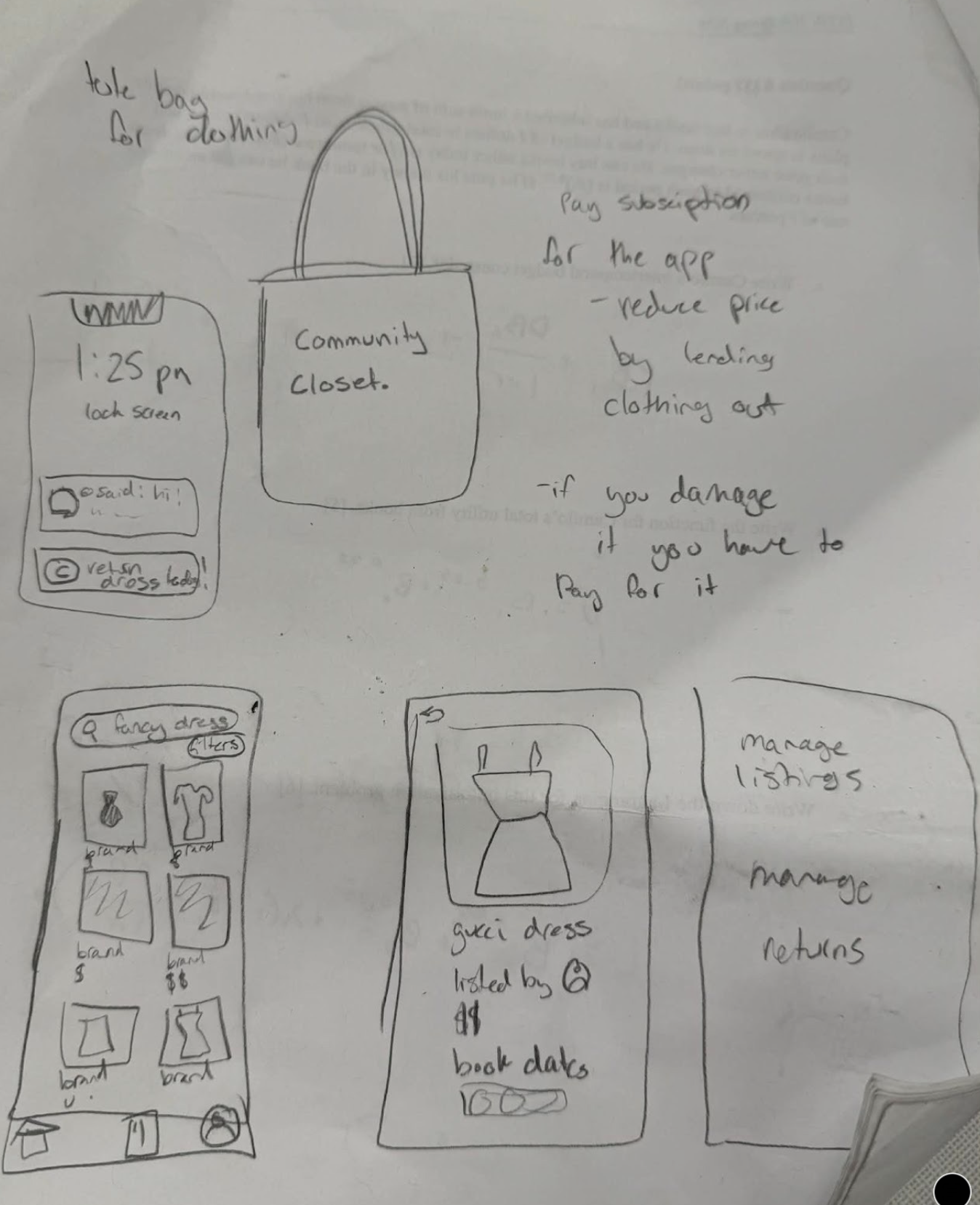
Our system is built through the connection of an app (digital experience) to the packages/kiosk system (physical experience) we designed the user experience to go beyond the digital experience through questions such as: what is the most desirable way to receive packages? To ship packages? (drone) What method of delivery is sustainable (local delivery vs regional )? What is a more cost effective method for users? (Kiosk drop off) we came up with the system where users interact with the app to decide what they want, and how they receive and ship the packages, either through the drone or through a kiosk. The app further integrates with the kiosk to enable users to sign in through their device, furthering the seamless experience.
Evaluation Method:
Mobile app prototypePrototyping Method: Video scenario prototype demonstrating the full lifecycle of the system, including downloading the app, renting clothing, and receiving the item through a kiosk or drone delivery.Evaluation Method: Semi-structured interviews after participants watch the video.Evaluation Goals: Understand the desirability of the concept, including whether users find the idea appealing, whether they would consider using the system, and what concerns they may have (e.g., hygiene, trust, clothing quality, or logistics).Kiosk cardboard prototypePrototyping Method: Interactive mobile interface prototype created in Figma that simulates the clothing browsing, listing, and rental process.Evaluation Method: Moderated usability testing where participants complete specific tasks using the Figma prototype.Evaluation Goals: Evaluate the usability of the interface, including whether users can easily navigate the app, list clothing, rent items, and understand pricing and rental duration.Video prototypePrototyping Method: Cardboard prototype of a clothing drop-off and pickup kiosk.Evaluation Method: Scenario-based interaction testing where users physically interact with the kiosk to simulate dropping off or retrieving clothing.Evaluation Goals: Assess the feasibility of the physical interaction, including clarity of instructions, ease of use, and whether the kiosk size and structure support the intended interaction.Behavioral prototypePrototyping Method: Simulated real-world interaction where users place a clothing order through the mobile interface and retrieve the item from the kiosk using a QR code.Evaluation Method: Behavioral user testing with observation of user actions and follow-up questions.Evaluation Goals: Understand how users move through the end-to-end system flow, identifying confusion points between the digital interface and the physical pickup process.
Prototype:
In the sections above, I explained how we made sure we know what scenario we are designing for, then we explored ideas and then push to the final design that we should go for by following the UN sustainability goal and the design goal. In this section, I will briefly talk about what how our four prototype helped us make design decisions and push our project moving forward.
Mobile app prototype
For the design of this mobile app, we initially wanted to create a high-fidelity prototype in Figma. However, after discussions within our team and consulting with the teaching team, we decided to use AI vibecode to produce an interactive high-fidelity prototype with only the frontend and no backend. This allows users to simulate input, making the testing experience more realistic. We used FigMake to create the high-fidelity prototype, and by repeatedly confirming the requirements with the AI, we ultimately developed this high-fidelity prototype with 2 main user flows, which support users’ rental and return processes.
Mobile app: homepage
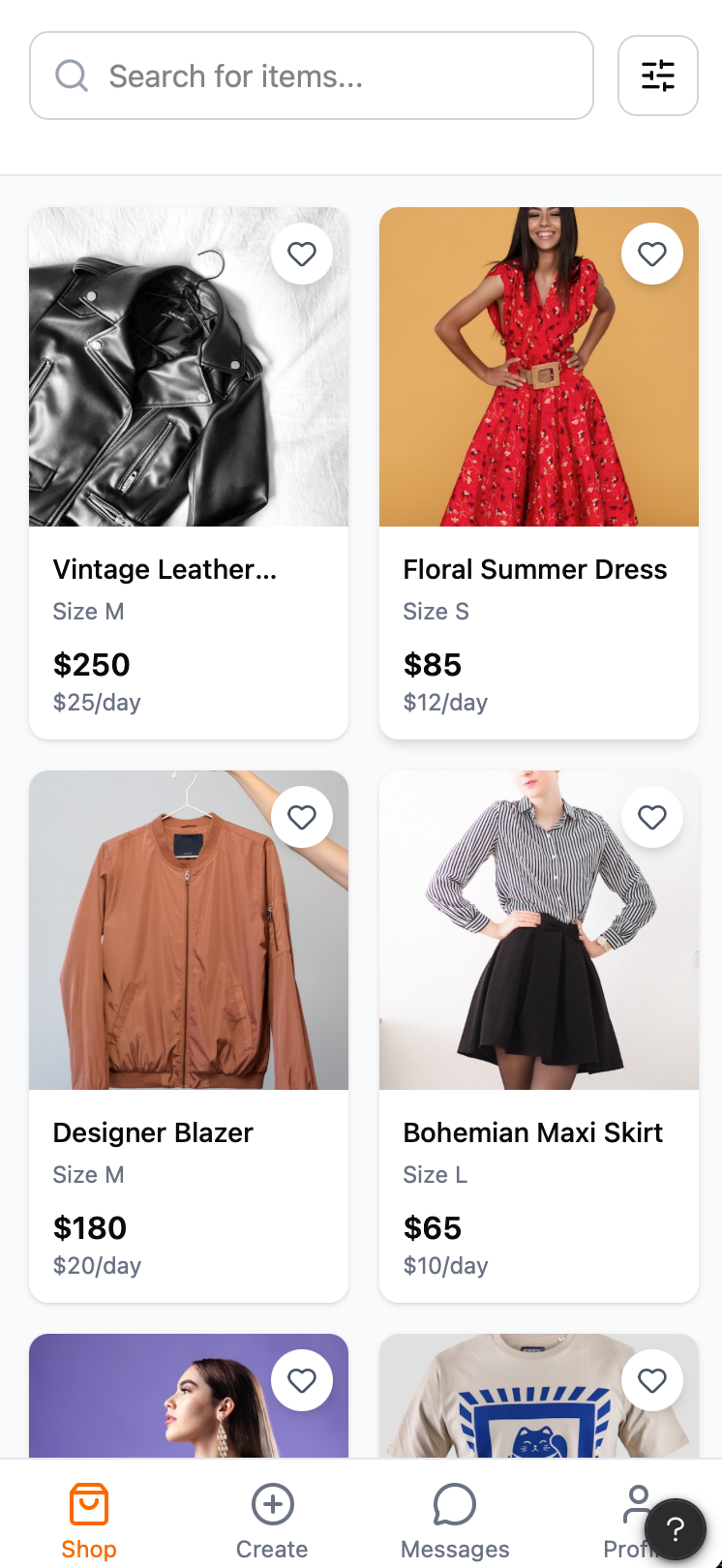
We had a lovely homepage for the user to browse through the clothes they want to rent, with the cost of clothes and clothes’s detail on it. By doing this, we keep the information being transparent so that the user will always be in the happy path.
Mobile app: Rental
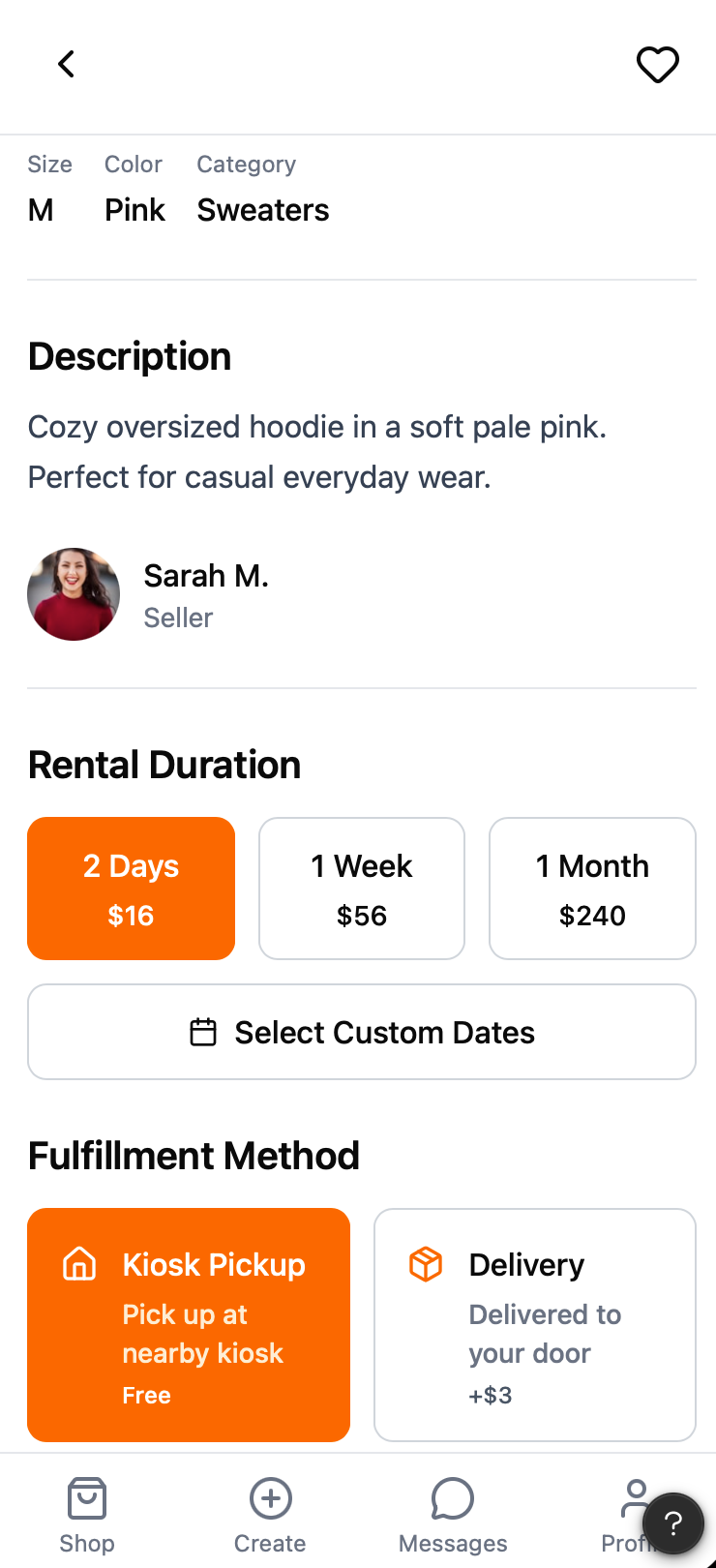
This is where user can rent the clothes. They have the ability to choose the duration of their rental and the way they want to pick up. In order to better support people who are busy to maintain their sustainability goal, we also provide a drone delivery option (We try to not use car which use fossil fuel and generate greenhouse gas). We also give user an option to send out their own clothes that they seldom wear to earn credit where they can use when renting clothes from others. By doing this, we encourage user to wear clothes that already produced but not looking for new clothes. In this way this align with our goal of UN sustainability and also our design goal.
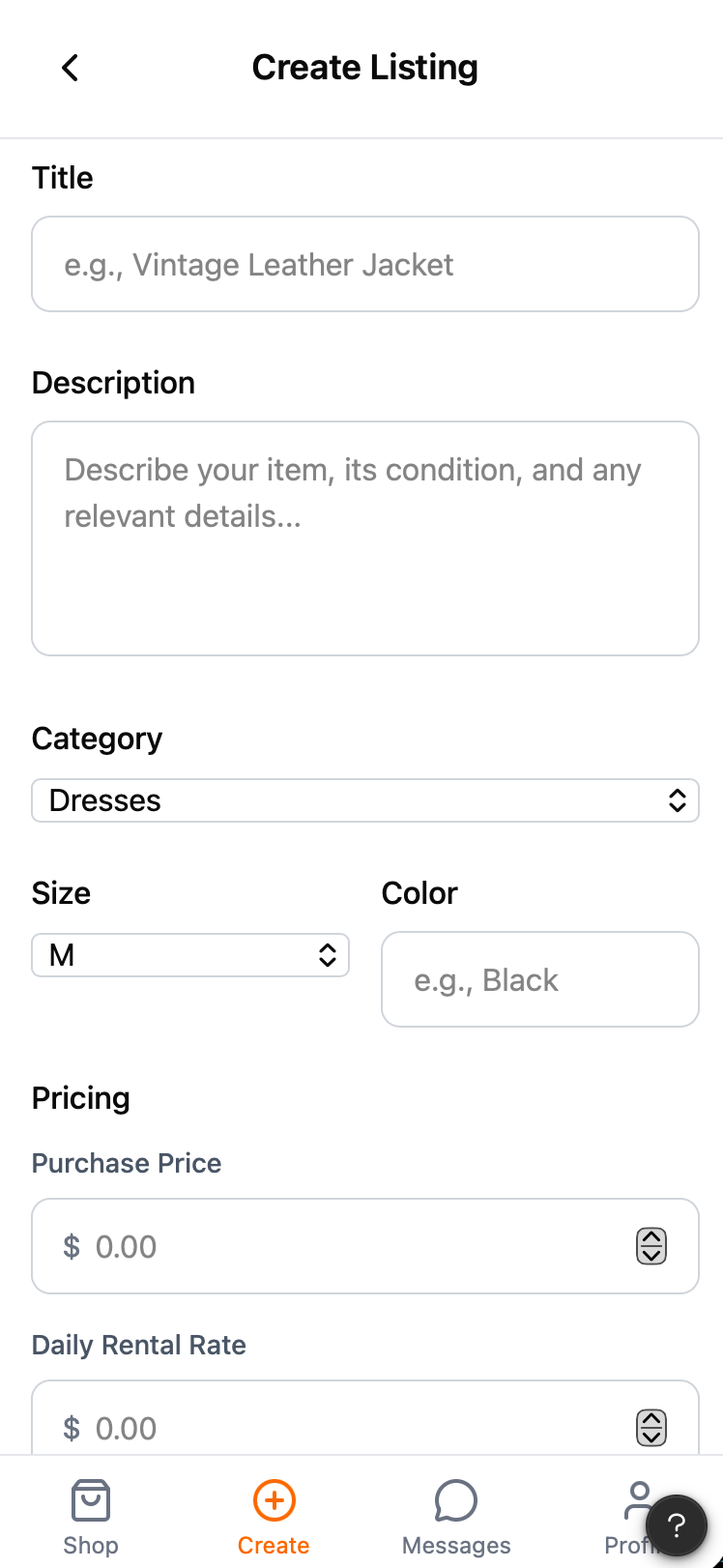
Mobile app: Upload
Just like I described above, this is where people can create their own clothes profile for others to rent. The can enter the detailed information of their clothes, specify the purchase price and daily rental rate.
Below is the FigMake link for you to try out the user flow: (if link could not work, please try the one in caption below)
https://www.figma.com/make/OMAdyKXqH4eE9j8sJjw1Zb/Clothing-Rental-App?t=rVGSCkvCTKpOFIz4-1
Kiosk cardboard prototype
At the same time, we also began the design of the kiosk. In our design, this kiosk consists of two parts: the operational machine and the locker.
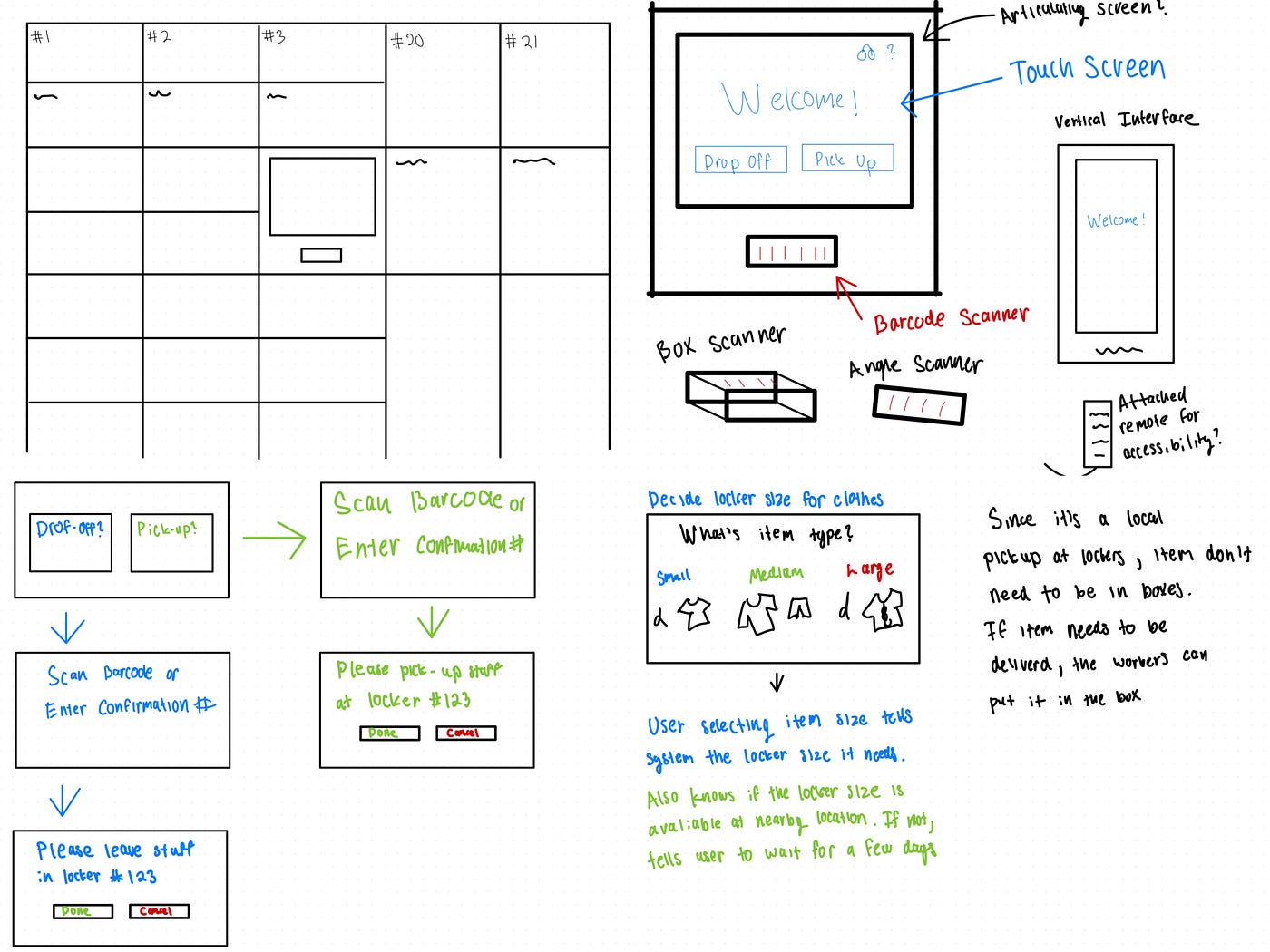
Sketch of interface and kiosk design
After successfully reserving or uploading clothes, users will receive a barcode via email, and then they can come to the kiosk set up in each community, select the corresponding service (drop off/pick up), and scan the barcode to open the locker. If the user is for drop-off, after opening the locker, the display screen will guide the user to place the clothes in the correct location, and then remind the user to close the locker; if the user is for pick-up, we will inform the user that the clothes are inside after opening the locker, and remind them to close the locker after taking them out. This design aligns us better with our design goals.
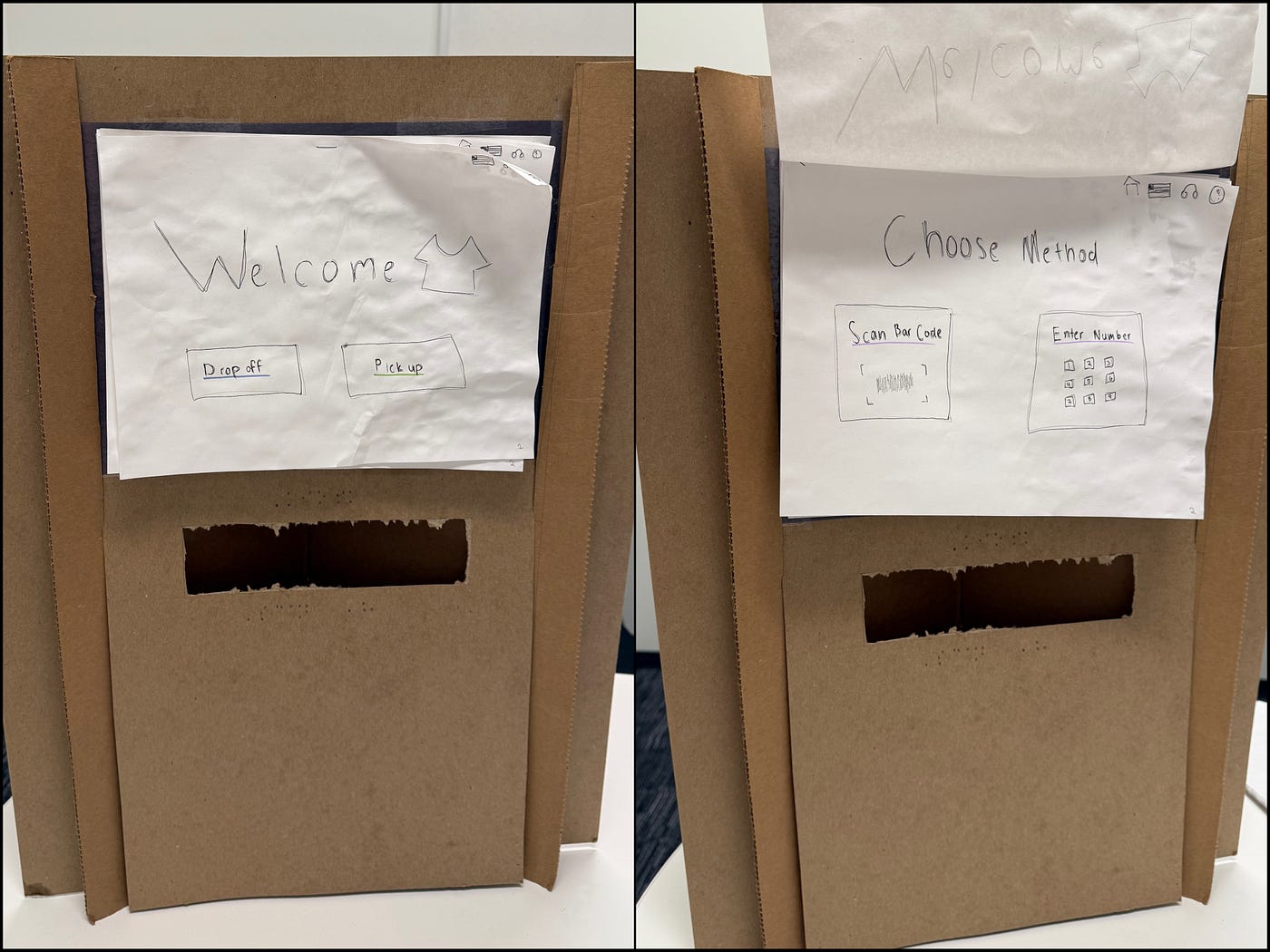
Showcase of the cardboard prototype of the locker
This is the locker we used in user testing (during the behavioral prototype).
Video prototype
After completing the design of the mobile app, we designed two using scenarios based on the previous 2 user flows.
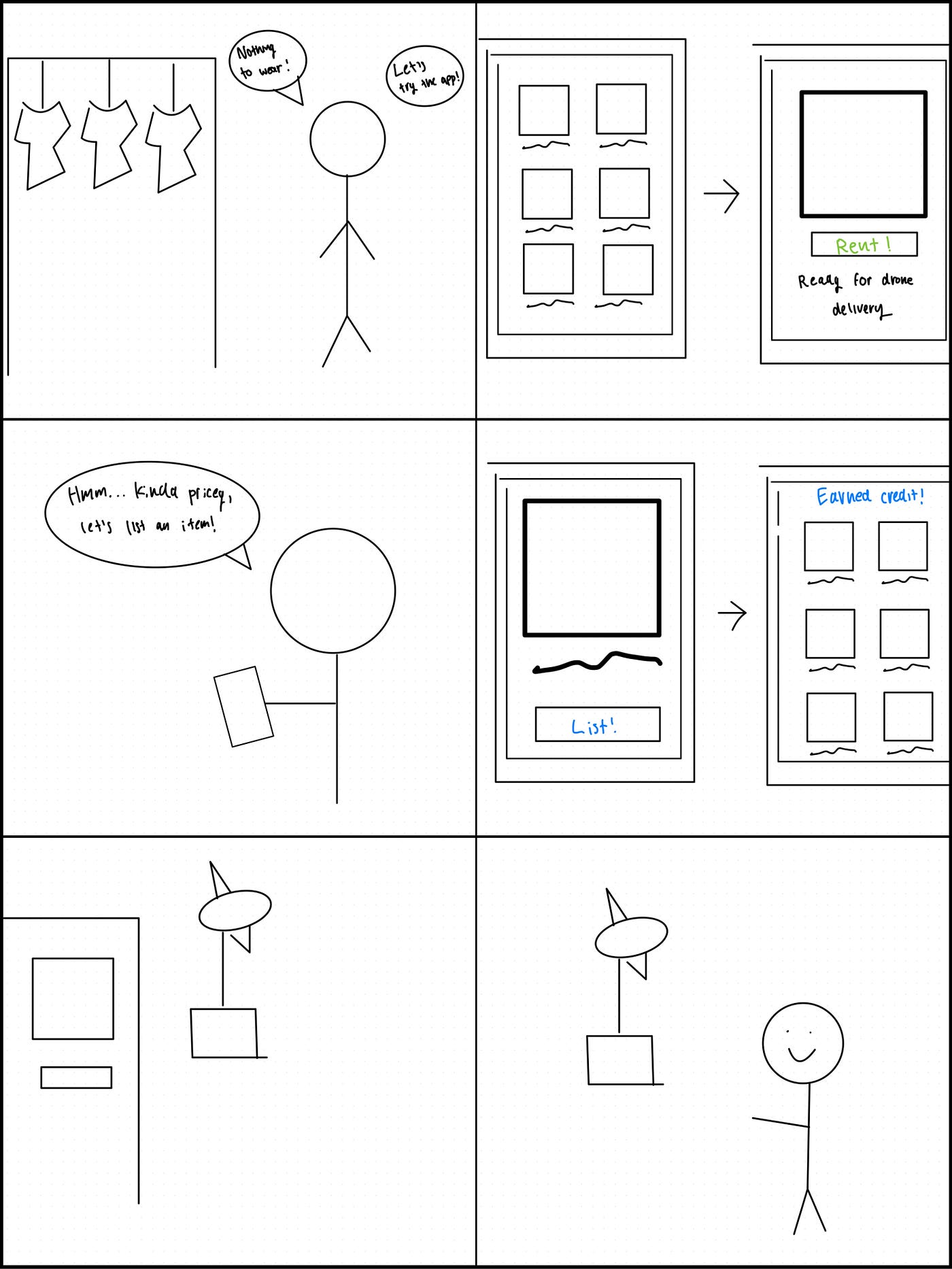
Storyboard sketch
Video prototype
Behavioral prototype
At the same time, in order to test user interaction with our mobile app and kiosk, we have designed three key testing scenarios for user interaction based on the video prototype: clothes rental, clothes upload, and clothes pick-up.
Final video demo
Summarize the above four prototypes, we have completed our final video demo, briefly showcasing our product concept and how we achieved it.
Feedback:
In class, we had a group feedback discussion. This is the feedback we received:
What works well?
The project clearly aligns with the UN Sustainable Development Goal of responsible and sustainable consumption by proposing a peer-to-peer clothing rental system that encourages reuse of clothing. The team did a good job designing a coherent system that combines a mobile interface with a physical kiosk, making the concept feel practical and grounded in real-world usage.
The mobile prototype was polished and thoughtfully designed, and it effectively demonstrated how users could browse, list, and rent clothing. Multiple prototypes (mobile UI, cardboard kiosk model, and video prototype) were used to explore different aspects of the system, which helped illustrate the overall user experience and design concept. Overall, the project successfully communicated the design objectives and showed meaningful effort in addressing a complex system.
What could be better?
While the project concept is strong, the physical prototype could be further developed to better simulate how the system would work in practice. The cardboard kiosk prototype was somewhat simple and did not fully demonstrate interactions such as clothing drop-off, pick-up workflows, or a deposit/return mechanism. Expanding the physical prototype or creating a digital kiosk interface prototype could help evaluate kiosk usability more effectively.
Additionally, the logistics of the system could be clarified, particularly how distribution works. For example, the design mentioned both delivery and kiosk pickup, but it was not entirely clear how these options would function together. Focusing on one primary distribution method or explaining the relationship between them could make the system easier to understand.
Finally, the video prototype could more clearly show users interacting with the kiosk, helping connect the mobile experience with the physical interaction in the overall system.
Takeaways:
Feedback from both my peers and my TA reveal that our design did successfully align with my design goals and stress on the pain point as well as following my scenario. But there this design have some minor issue that may or may not impact it functionality. It could be better if we,
- further developed the physical kiosk prototype to better simulate how users would drop off and pick up clothing in the system.
- demonstrated the kiosk interaction more clearly in the video prototype, showing how users transition from the mobile app to the kiosk.
- added more functional details to the physical prototype, such as a deposit system or clearer interaction steps.
Acknowledgment:
Special thanks to my group member Rachel Berg, Stephanie Nguyen, TA Nichole Sams and Instructer Brock Craft, and all the peers from HCDE 351 Winter 2026 for their valuable feedback.
Thanks for reading! : )
Technological Appendix:
AI usage:
- We used ChatGPT in correcting my grammar and typo;
- We used NotebookLM to help me organize user feedbacks;
- We discussed with ChatGPT of parts I should improve with the feedback I got.
- We used FigMake AI to help we make the mobile app prototype.
Writing reference:
- We used the overall structure of the blog from my last blog as a reference of this blog. Some of the words written by myself are the same (some transition sentences and words).
- Here is my reference blog: https://antaresyuan.site/blog/hcde-351-a6-behavioral-prototype-minecraft-ai-assistant/